

If your BackWPup version is minor or equal to 3.7.0, the info here reported cannot be applied. Please instead refer to BackWPup License Update .
Se invece la tua versione è superiore alla 3.7.0, puoi seguire le istruzioni riportate qui di seguito.
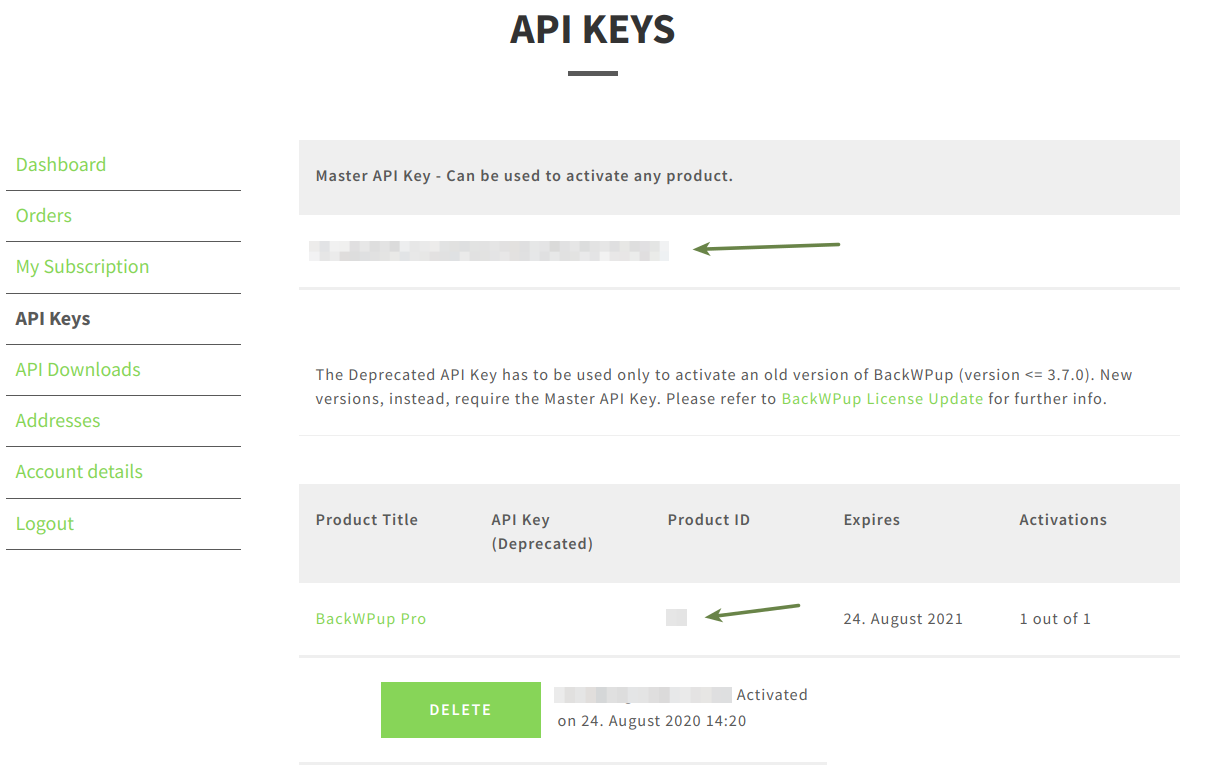
- Please log in to your BackWPup customer account. You will find your license on the page My account in the section Dashboard or API key. Copy the license (Master API Key) to the clipboard.
- Log in to WordPress and go to BackWPup Pro → Settings and select the License tab.
- Paste the license key from the clipboard into the field Master API Key.
- Torna indietro e copia il ID prodotto e incollalo nel campo ID prodotto.
- Salva le modifiche.
In your customer account, go to the section Dashboard or API Keys or otherwise have a look at BackWPup Pro → Settings via the backend in the License tab to see if your license was activated successfully.
Ricevo il messaggio di errore «Numero massimo di attivazioni superato»
You can only activate BackWPup on as many WordPress Installations as you have licences available. If you get this error message, you already activated all licences you bought. You need to delete an activation via your www-test.backwpup.com account or via your WordPress backend before you can activate again.
Troubleshooting: If you have troubles activating or deleting your licence via your WordPress backend, please check your account dashboard at www-test.backwpup.com to ensure the licence is not active in the shop on the same domain.
If you see the licence activated, delete the activation via your my account and try to activate again via your WordPress backend.